
Save Time And Invite All Your Friends To Your Facebook Fanpage At Once!
So you’ve just created a brand NEW Facebook Fanpage now what?
Yes you can pay to promote your page to get some page LIKES but the first rule of thumb would be to at least invite the friends you already have on your Facebook Personal Profile.
Now let’s face it, most of us have anything from hundreds to thousands of friends on our personal profiles. I for one have over 3000!
The thought of sitting there ticking invite, click by click, group by group was totally daunting.
In fact it was in the ‘too hard’ basket so I hadn’t bothered to even do it at all.
I ran a promotion and paid Facebook to bring in some instant fans and while this strategy works it can be costly depending on your budget.
Ok, so I was on a mission to search a simple solution and guess what? I found one that I’m about to share with you today.
Follow these simple instructions and you will have tons of LIKES and new FANS to your page in no time!
Step 1
Please READ all the instructions under each image carefully!
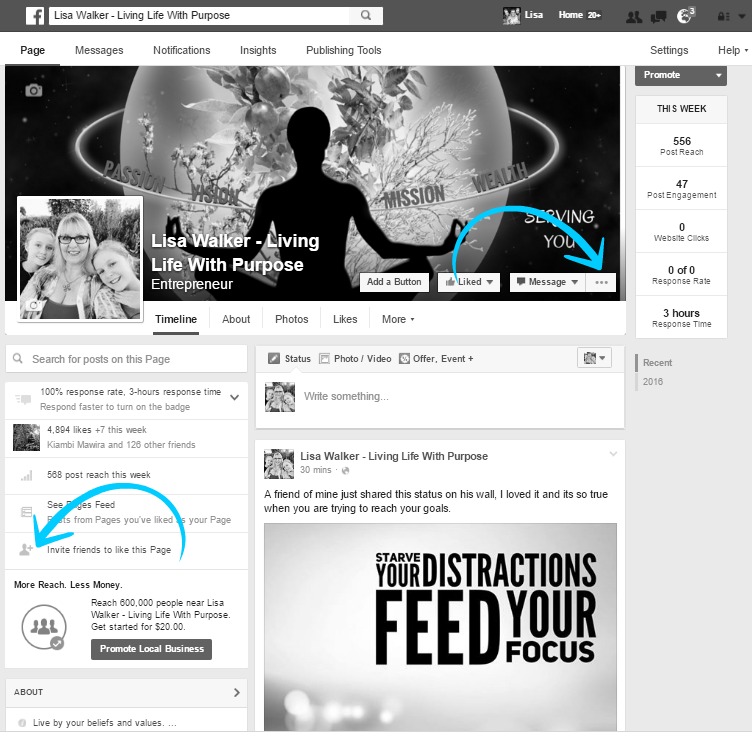
Log in to your personal Facebook Profile using Google Chrome and go to the Facebook Fanpage you are wanting to promote.
This process is recommended from a laptop or desktop computer and for this to work you do need to use Chrome as your browser.
If you are an administrator of this page, click the … (ellipsis) in your cover photo and click Invite Friends.
If you are not an administrator of this page, click Invite friends to like this Page in the left sidebar.
Either way, an Invite your friends to like… window will pop up.
PLEASE TAKE NOTE: I have previously already performed this instruction on this fanpage I am showing you this tutorial on, therefore that’s why you will see all my friends showing they have already been invited.
Most of your friends name will probably have a small box around the word INVITE.
Step 2
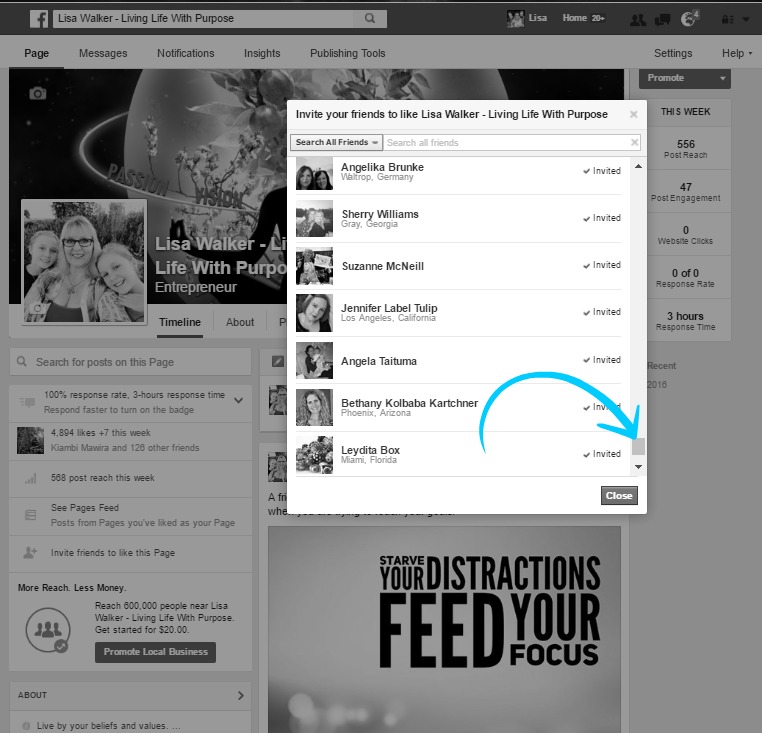
A window will pop up to “Invite your friends to like” simply scroll down to the bottom of the list.
This could take quite a while if you have a lot of friends but you could also try clicking the name of any friend in your list, then hold down the space bar or page down button to speed up the process.
To complete these next steps, make sure you leave the “Invite your friends to like” window OPEN with all of your friends loaded.
Step 3
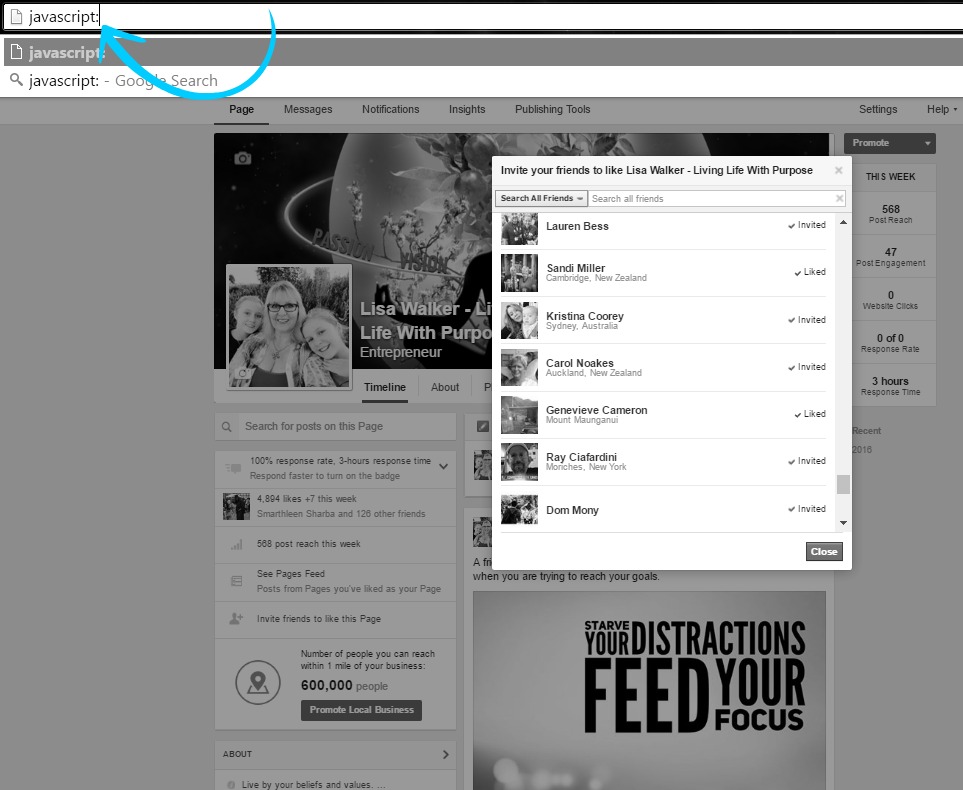
This next step is very important so make sure you type it correctly — manually type javascript: into your address bar. Be careful not to click outside the open Friends List window or it may close and you’ll have to start again.
Step 4
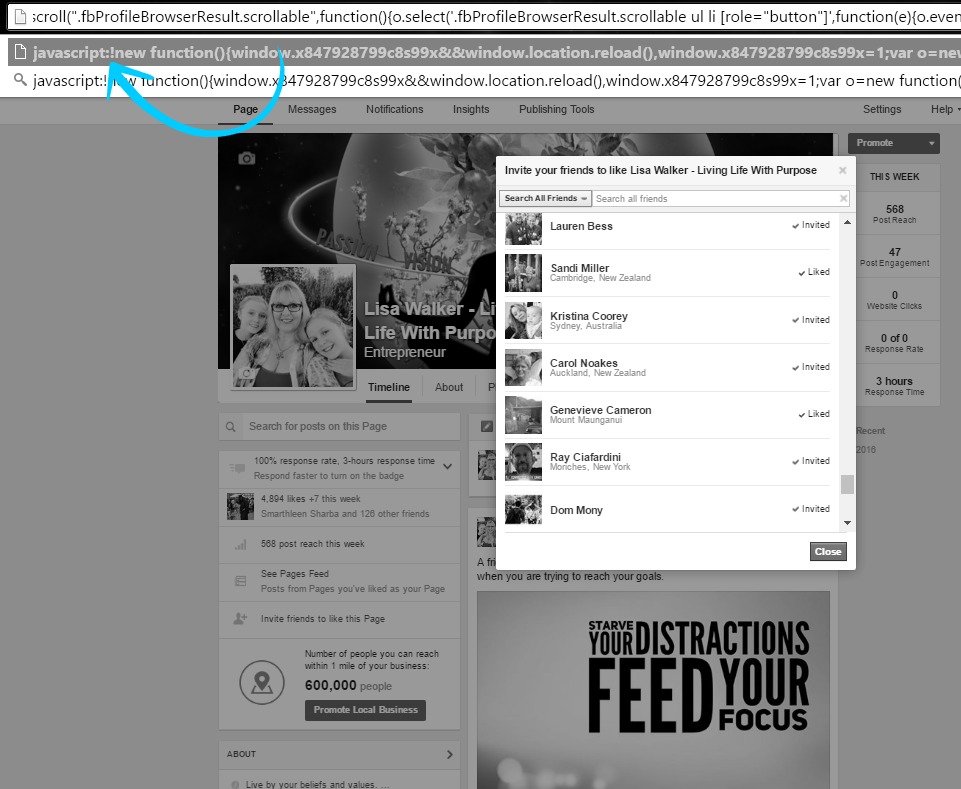
Now to go ahead and do this final step, you first need to carefully copy some code. Remember, if you miss even a single character, this code won’t work.
Click this BLUE button below to open the code in a new browser and copy:

Ok, so by now you should have your code copied. Go back to your open Facebook Fanpage Tab and ‘right next’ to where you typed the word javascript: copy the new code.
Do not leave any spaces between the colon and your newly pasted code. HIT THE ENTER KEY
Now this process could take a little while if you have A LOT of friends. I walked away from my computer for a while when it was in progress.
Finished?
See – How Easy Was That To Quickly Invite Your Friends To Your Facebook Fanpage?
If this method worked as well as it worked for me, please leave a comment to let me know.
If for any reason this method did not work for you or maybe your computer crashed just repeat the steps. There is a possibility not all your friends go invited so redo the process.
Repeat these steps until you have managed to invite all your friends to like your Facebook Fanpage (only if you have too)
Congrats you are on your way to thousands of fans!!
Loved this tutorial?
I share online marketing tips and how too’s every day in our ‘private facebook group’ click HERE to request to join.

Thanks for reading this tutorial on quickly gaining fans to your new Facebook Fanpage, best of luck with your new page!